WooCommerce – Minimum Amount Checkout
Set a store-wide minimum order amount. Shoppers see a notice, and Place Order stays disabled until the cart reaches it.
FreeDownload ↓
Add video links to any WooCommerce product and show them on the product page — a slider when there's more than one.
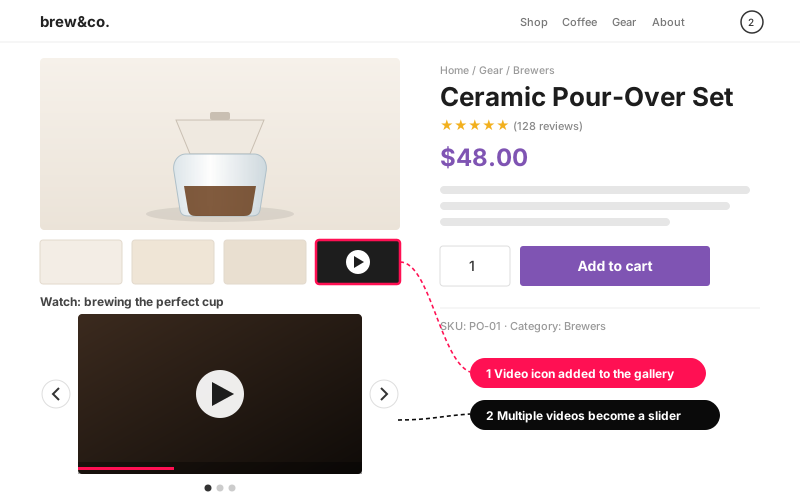
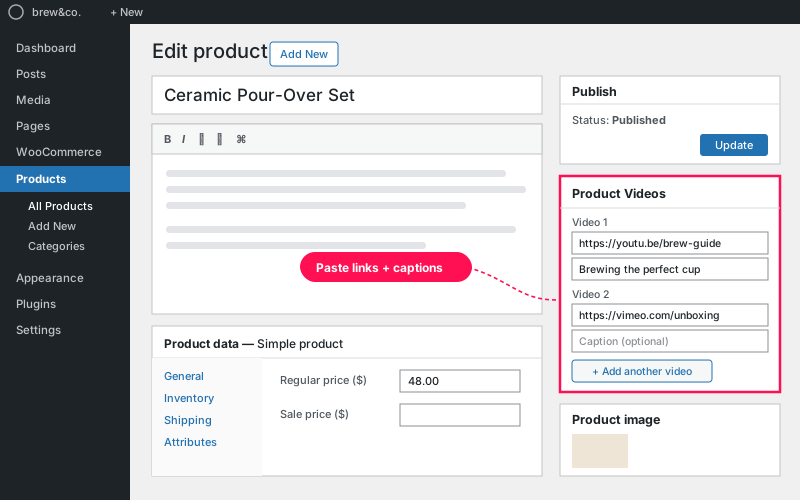
Adds a Product Videos panel to the product editor. On the front end, videos appear below the product photos, in the same column as the gallery — and a video icon at the end of the gallery jumps visitors straight to the player.
.mp4, .webm, .ogg, .ogv, .mov). Other links fall back to WordPress oEmbed, then to a plain link..zip you downloaded and click Install Now.YouTube, Vimeo and self-hosted files (.mp4, .webm, .ogg, .ogv, .mov). Anything else falls back to WordPress oEmbed, and if that fails, a plain link.
Below the product photos, in the same column as the gallery. A video icon is added as the last gallery item — clicking it scrolls straight to the player.
Yes, as many as you like. Two or more automatically turn into a slider with arrows and dots.
Yes — GPL-2.0, free forever, no upsells inside the plugin.
I customize plugins and build new ones from scratch — same care, made for your site.
Set a store-wide minimum order amount. Shoppers see a notice, and Place Order stays disabled until the cart reaches it.
Show your live WooCommerce product count anywhere with one shortcode — filter by category or status if you like.
Choose exactly which file types can be uploaded to WordPress, with a simple ON/OFF toggle for each one.
Comments
Every comment is reviewed before it appears.
No comments yet — questions, ideas and bug reports are all welcome.