Home/Freeware/WordPress/Simple Popups
WordPress pluginMarketingPopupsProductivityWordpressPluginFreeFree

Wordpress Simple Popups

Create popups with your own editor or a single image, and choose exactly where, when and how often they appear.
Version 1.0.1WP 5.8+PHP 7.2+Updated Nov 2026Downloads 0

What it does 01

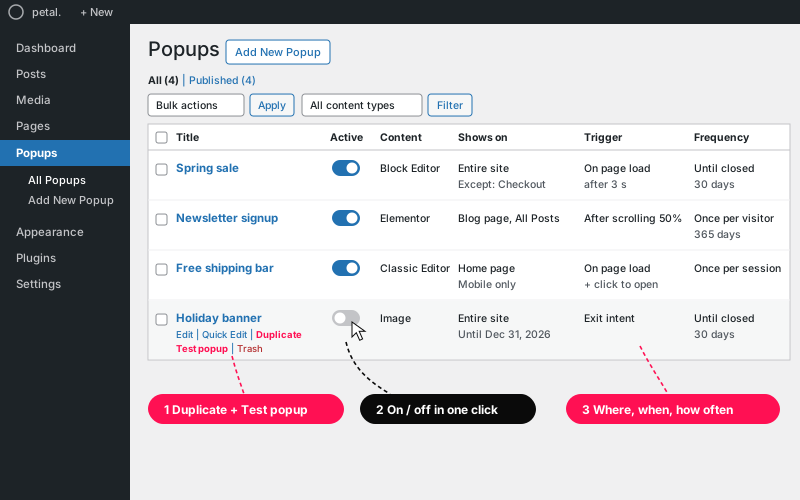
Adds a Popups section to WordPress. Each popup is listed like a post, so you can save drafts, schedule, duplicate and trash them. Design it with the editor you already use, or just pick an image. Then choose where it shows, what opens it, and how often each visitor sees it.

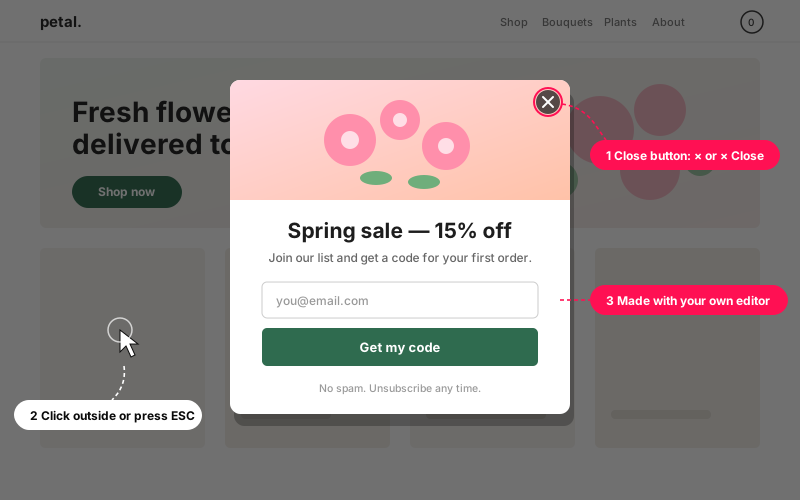
  • Build the content with the Block Editor, Classic Editor, Elementor or WPBakery. You can also use a single image, with an optional link and a separate image for phones.
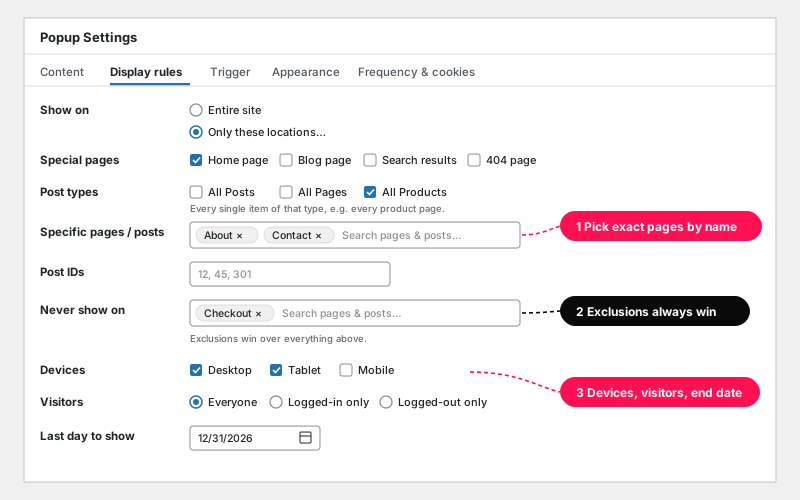
  • Show it on the entire site, or only on the home page, blog page, search results, 404 page, whole post types, specific pages and posts, or post IDs. Exclusions always win.
  • Limit it by device (desktop, tablet, phone) and by logged-in or logged-out visitors, and set a last day to show.
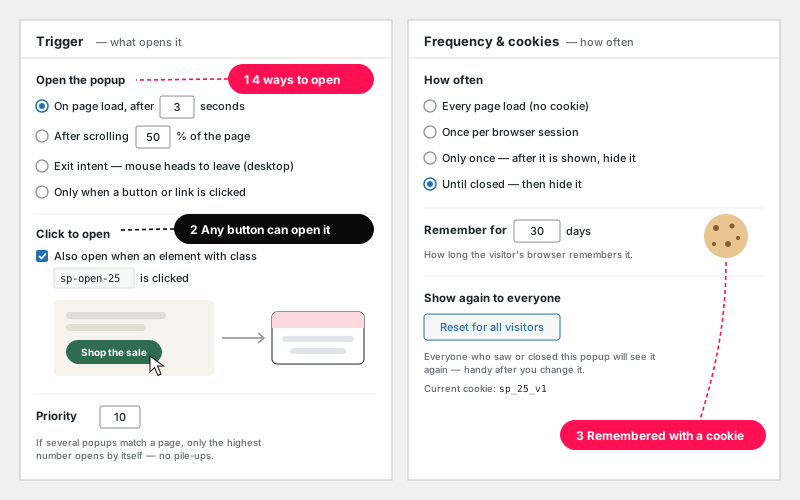
  • Open it on page load (with a delay), after scrolling, on exit intent, or when any button or link is clicked.
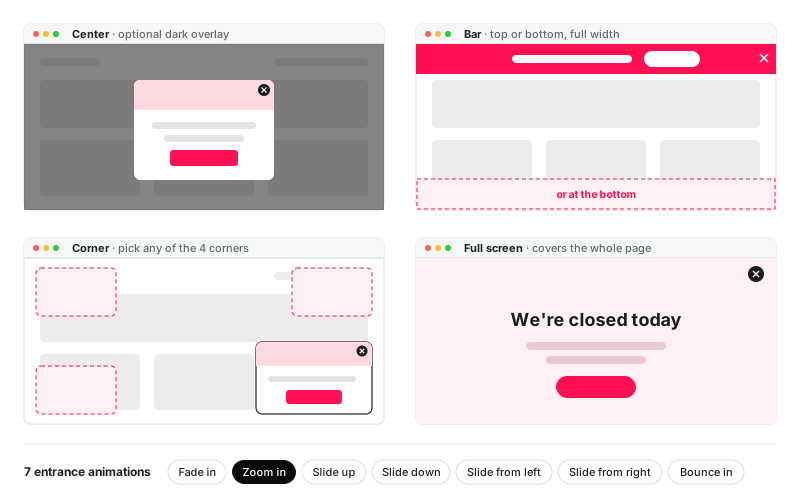
  • Place it in the center, as a top or bottom bar, in any corner, or full screen, with 7 entrance animations.
  • Close it with the × button, a click outside, the ESC key or an auto-close timer. Clicking inside the popup never closes it.
  • Show it on every page load, once per session, only once, or until closed. A cookie remembers this for as many days as you like, and Reset for all visitors shows it to everyone again.
  • Priority prevents pile-ups: when several popups match a page, only the highest one opens by itself.
  • On/off switch, Duplicate, and a Test popup link that ignores cookies and rules (editors only).
  • Loads its files only on pages that have a popup, works with page caching, is keyboard friendly, and respects "reduce motion".

Setup 02 · about 3 minutes

  1. Install & Activate it. In WordPress go to Plugins → Add New → Upload Plugin, choose the .zip you downloaded and click Install Now. A new Popups menu appears in the dashboard.
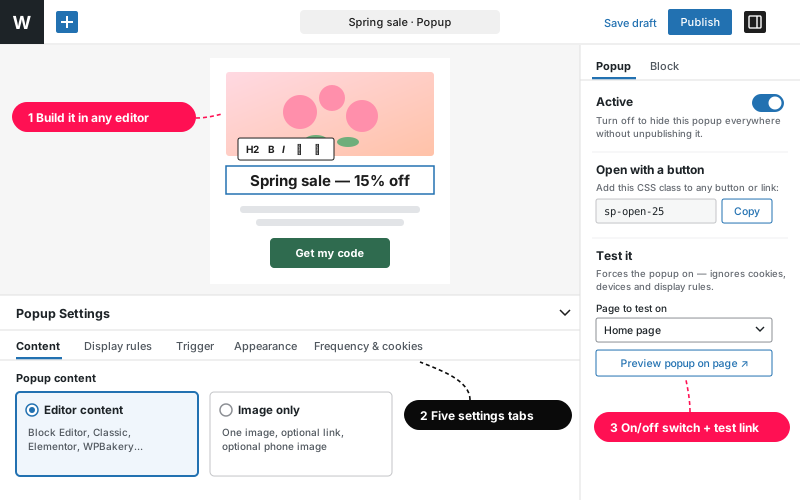
  2. Create a popup. Go to Popups → Add New Popup and build the content in your editor. To use a picture instead, open Popup Settings → Content and choose Image only.
  3. Choose where and when. Pick the pages in Display rules and what opens the popup in Trigger. Set the position and animation in Appearance, and how often it shows in Frequency & cookies.
  4. Publish and test. In the Popup box, use Test it → Preview popup on page to see it on any page, even after you've closed it.

FAQ 03

Which editors can I use?

The Block Editor, Classic Editor, Elementor and WPBakery all work. Or skip the editor and show a single image. If WPBakery's buttons don't appear on the popup screen, turn on "Popups" in WPBakery → Role Manager → Post Types.

How do I open a popup from my own button?

Add the class `sp-open-ID` to any button, link, image or menu item, or link to `#sp-ID`. Each popup's side box shows its class with a Copy button. The popup's display rules must also allow that page.

What if several popups match the same page?

Only the one with the highest priority opens by itself, so visitors never get a pile-up. Popups opened with a button always work.

I closed my popup while testing. How do I see it again?

Use Test it → Preview popup on page in the popup's side box. It ignores cookies, devices and display rules. To show it to every visitor again, click Reset for all visitors, then Update.

Does it work with caching plugins?

Yes. Cookies, devices and triggers are checked in the visitor's browser, so cached pages work correctly.

Is it really free?

Yes, free forever under the GPL, with no sign-up and no upsells. It doesn't track you or your visitors. Its only cookie remembers whether a visitor already saw or closed a popup.

Changelog 04

1.0Nov 13, 2026 · Latest
  • - First release
1.0.1Nov 13, 2026
  • - In the Block Editor, the popup settings now open automatically under the content
  • - Blocks used only inside a popup now load their styles
  • - After Reset for all visitors, saving again no longer resets a second time
Need it to do something else?

I customize plugins and build new ones from scratch — same care, made for your site.

Ask me

Comments

Every comment is reviewed before it appears.

No comments yet — questions, ideas and bug reports are all welcome.

Leave a comment

Replying to
Comments are moderated and appear once approved. Your email is only used to notify you of replies.
Thanks! Your comment is awaiting moderation and will appear once it's approved.
Freeware

More free plugins.

All freeware →
WordPress

WPForms Email List Extractor

Export every email from your WPForms entries, even forms with two email fields, to CSV, TXT, JSON or HTML. Filter by form and date.

FreeDownload ↓
WordPress

WooCommerce Product Count Shortcode

Show your total WooCommerce product count anywhere with one shortcode. Filter by category, and leave out hidden products if you like.

FreeDownload ↓
WordPress

WooCommerce Products Video Slider

Add video links to any WooCommerce product and show them on the product page — a slider when there's more than one.

FreeDownload ↓